free worldwide shipping | ships within 24 hours

Lightroom Classic vs Lightroom: Which One Do You Actually Need?

Adobe’s two Lightroom apps are both powerful photo editors, but they serve completely different workflows. Choosing the wrong one means frustration. This Lightroom Classic vs Lightroom guide breaks down the real differences so you pick right.

Quick Answer: Lightroom Classic vs Lightroom
Choose Lightroom Classic if you manage thousands of photos on your own hard drives and need pro tools like tethered shooting and printing.
Choose Lightroom (non-Classic) if you want to edit anywhere—phone, tablet, laptop—with everything synced to the cloud.
That is the biggest difference in the Lightroom Classic vs Lightroom debate.
The Core Difference: Where Your Photos Live
This one decision decides everything in the Lightroom Classic vs Lightroom comparison.
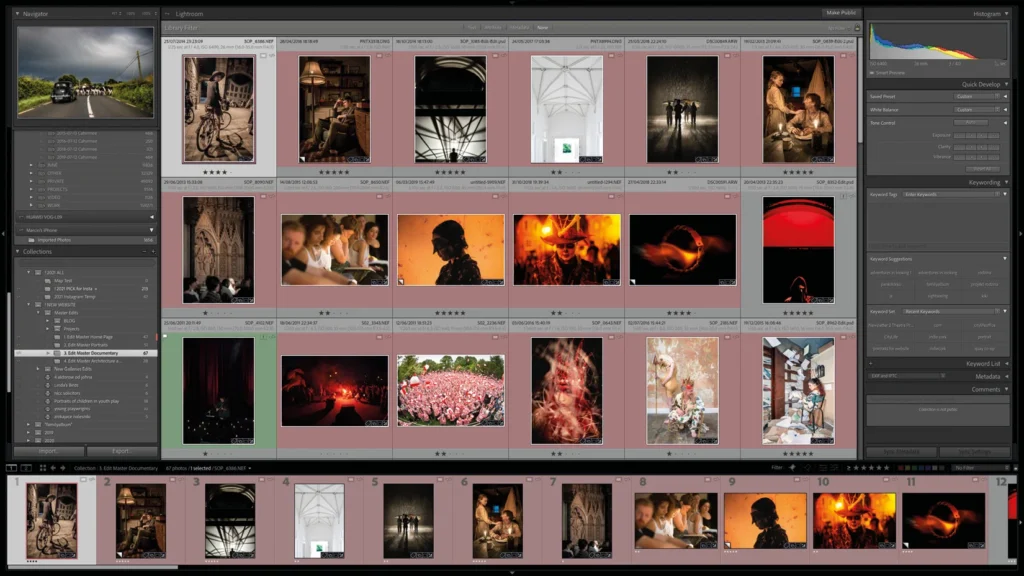
Lightroom Classic stores your photos on your computer or external hard drives. Your files stay local. You control the folders. You manage the backups.
Lightroom (cloud version) stores your full-resolution originals in Adobe’s cloud. Every device syncs automatically. You can edit on your desktop, then continue on your phone.
Bottom line: Local control vs cloud convenience. This is the heart of the Lightroom Classic vs Lightroom decision.
Lightroom Classic vs Lightroom: Feature Comparison
| Feature | Lightroom Classic | Lightroom |
|---|---|---|
| Storage | Local hard drive | Cloud (1TB included) |
| Access | Desktop only | Desktop, mobile, web |
| Printing | Yes | No |
| Tethered shooting | Yes | No |
| Plug-ins | Yes | No |
| Smart Collections | Yes | Limited (desktop only) |
| AI semantic search | No | Yes |
| Preset syncing | No | Yes (across devices) |
| Virtual copies | Yes | No (uses Versions) |
| History panel | Yes | No |
| Book module | Yes | No |
| Video editing | Basic | Yes |
When to Choose Lightroom Classic
Lightroom Classic is the industry standard for professional photographers who manage large local libraries. Here is who it is for in the Lightroom Classic vs Lightroom debate:
You already have a system. You have folders, external drives, and backup routines. Classic fits right in. You keep everything organized your way.
You shoot tethered. Classic supports direct camera-to-computer shooting for Canon, Sony, and Fujifilm. The cloud version does not.
You print your work. Classic has a dedicated Print module with soft-proofing and custom layouts. Cloud Lightroom cannot print at all.
You need plug-ins. Classic supports third-party tools for specialized noise reduction, photo printing services, and more. Cloud Lightroom does not.
You shoot events or weddings. Classic’s Smart Collections organize massive catalogs automatically. The history panel lets you track every single edit.
You want total local control. Classic never forces cloud uploads. Your files stay on your drives. You only upload Collections you choose to sync to mobile devices.
Bottom line: Classic is the pro tool for photographers with large local libraries who need specialized workflows. In the Lightroom Classic vs Lightroom battle, Classic wins for professionals.
When to Choose Lightroom (Cloud Version)
Cloud Lightroom is designed for creators who edit across multiple devices. Here is who it is for in the Lightroom Classic vs Lightroom comparison:
You edit on the go. You start on your desktop, continue on your tablet in the coffee shop, and finish on your phone. Cloud Lightroom syncs everything.
You shoot with your phone. The mobile app includes a built-in camera with manual controls. Photos go straight to your cloud catalog. Cloud Lightroom is the perfect workflow for mobile-first creators.
You hate keywording. Cloud Lightroom uses AI semantic search. Search “dog” and it finds dogs—no keyword tagging needed. Classic cannot do this.
You want community inspiration. Cloud Lightroom has a Discover tab where you can see other photographers’ edits, remix them, and share your own. Classic is solo only.
You are a beginner. The interface is cleaner. Tools are simpler. Tutorials are built in. Classic can feel overwhelming with its modules and panels.
You have multiple computers. All your photos are accessible from any device. Classic uses a single catalog per computer, making multi-device use complicated.
Bottom line: Cloud Lightroom is ideal for creators, mobile photographers, and anyone who wants to edit everywhere without managing files. In the Lightroom Classic vs Lightroom decision, cloud wins for mobility.
What They Share: The Editing Experience
Good news—both apps share the same editing tools. The Develop engine is identical in the Lightroom Classic vs Lightroom comparison:
- Color and lighting adjustments
- AI-powered Denoise
- AI object removal
- Lens blur, masks, and profiles
- HDR and panorama stitching
- AI masking (subject, sky, people, background)
Your editing skills transfer between both versions. Presets and profiles work in both. If you learn one, you know the other.
Lightroom Classic vs Lightroom: Pricing
Adobe does not sell these separately. One subscription gives you both apps .
| Plan | Price | Includes |
|---|---|---|
| Lightroom Plan | $9.99/mo | Lightroom + Lightroom Classic + 1TB cloud |
| Photography Plan | $19.99/mo | Lightroom + Lightroom Classic + Photoshop + 1TB cloud |
Both plans include 1TB of cloud storage. The Photography Plan adds Photoshop and 1,000 monthly generative AI credits.
Can You Use Both?
Yes. Many photographers use Classic as their main library and sync selected Collections to the cloud for mobile editing. This gives you the best of both: local control and cloud mobility.
However, Adobe does not recommend syncing both desktop apps simultaneously. Pick Classic as your master library and selectively sync Collections for mobile access.
Lightroom Classic vs Lightroom: Summary
| Choose Lightroom Classic if… | Choose Lightroom (cloud) if… |
|---|---|
| You manage local hard drive libraries | You edit on multiple devices |
| You need printing and tethered shooting | You want everything synced automatically |
| You rely on plug-ins | You hate keywording |
| You shoot events or weddings | You shoot with your phone |
| You want total file control | You want community and inspiration |
| You are a professional | You are a beginner or mobile creator |
Frequently Asked Questions About Lightroom Classic vs Lightroom
Which is better: Lightroom Classic or Lightroom?
There is no “better” in the Lightroom Classic vs Lightroom debate. There is only “right for you.” Classic is better for professionals with large local libraries. Cloud is better for creators who edit on multiple devices.
Can I use both Lightroom Classic and Lightroom?
Yes. Many photographers use both. Classic is your master library. You sync selected Collections to the cloud for mobile editing.
Does Lightroom Classic sync with Lightroom?
Yes. You can sync Collections from Classic to the cloud. Those photos appear in Lightroom on your phone and tablet.
Which Lightroom is better for beginners?
Lightroom (cloud version) is better for beginners. The interface is cleaner. Tools are simpler. Tutorials are built in. Classic has a steeper learning curve.
What is the price difference between Lightroom Classic and Lightroom?
There is no price difference. One subscription gives you both apps. The Lightroom Plan costs $9.99/month. The Photography Plan costs $19.99/month.
NEED STORAGE FOR YOUR LIGHTROOM CLASSIC CATALOG?
Browse our Shop accessories category for external hard drives and memory cards at Camerion Cameras.